Matches macOS
The condition is read from the system, so a service warning agrees with System Settings.
See health calculated from the battery’s reported capacity, alongside cycle count and Apple’s service condition. Understand what the reading means before deciding whether it needs attention.
Charge tells you how full the battery is now. Health estimates how much energy it can hold compared with its original design capacity. WhatBattery calculates that figure from the capacity reported by the battery and shows one decimal place.
The capacity is an estimate from the battery’s own gauge. It can move as the gauge recalibrates, so a small change alone does not establish faster wear or a need for replacement. Cycle count and Apple’s Normal or Service Recommended condition provide more context.
When macOS’s health figure differs, WhatBattery shows both. Pro adds a longer record so you can follow the trend.
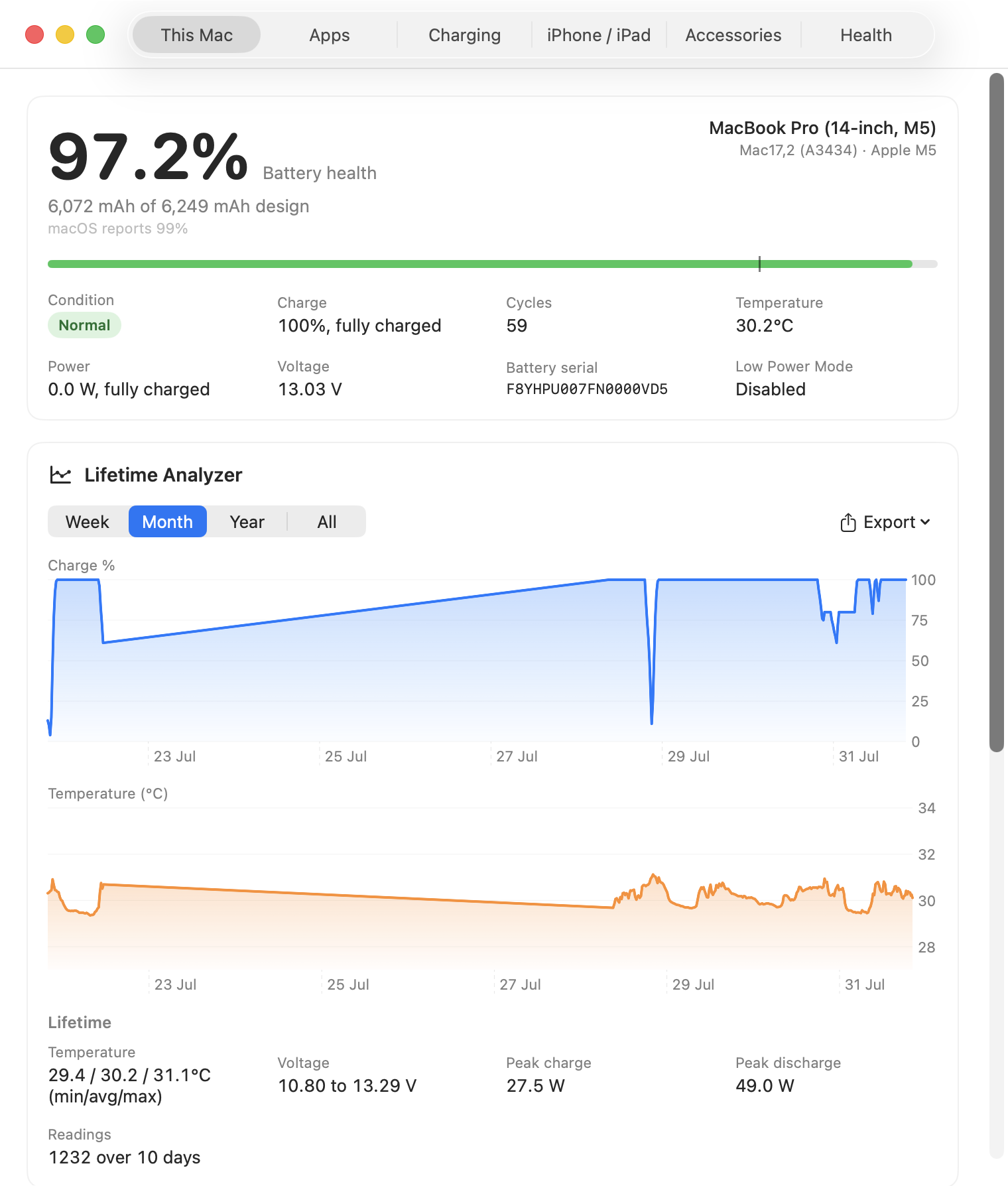
There is no dependable public signal that proves a battery is genuine. WhatBattery does not add a green “genuine” badge to incomplete evidence. It shows the service condition, capacities, health, cycles, and identifiers the system can actually support.
The condition is read from the system, so a service warning agrees with System Settings.
WhatBattery observes. It never enforces a charge limit or writes to the battery.
If the system refuses a reading, the app shows that it is unavailable instead of guessing.
Free on Apple Silicon Macs running macOS 14 or later.